
Description
Interference rarely shows up where the lab is. The Tektronix RSA507A spectrum analyzer is a portable, battery-powered field unit that covers 9 kHz to 7.5 GHz. It sends data over USB 3.0 to a computer running SignalVu-PC, so you can walk a site with a small kit.
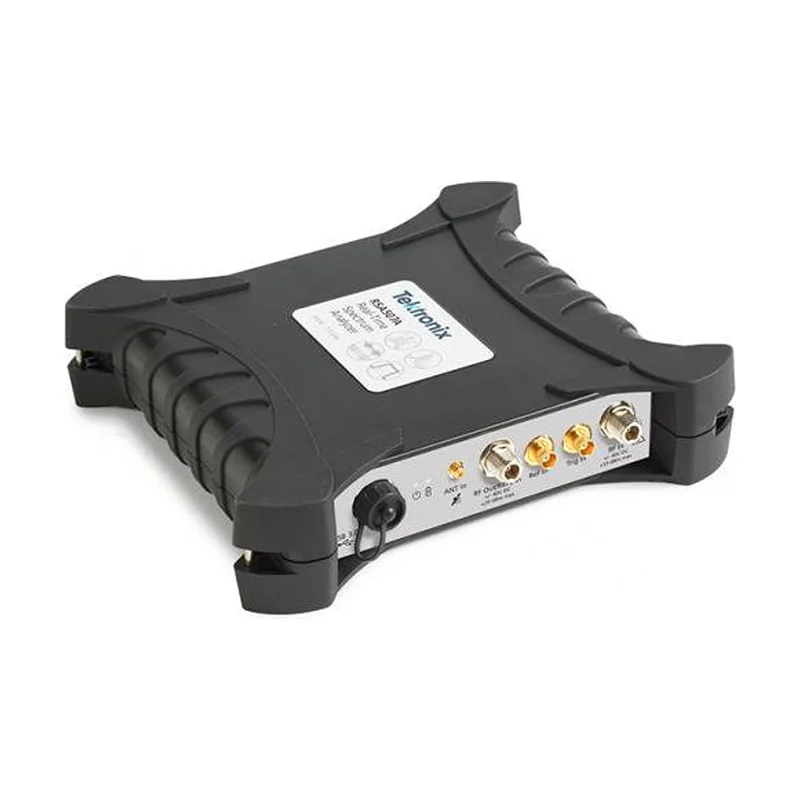
Built for the field
This analyzer belongs to the RSA500 series. However, it has no screen of its own. The connected computer provides display and control, and the listing does not assume a computer comes with it. So pick a host that meets the SignalVu-PC requirements before you travel.
Tuning range versus real-time window
Two numbers describe the RF side. First, the range, 9 kHz to 7.5 GHz, shows where the analyzer can tune. Second, the 40 MHz real-time bandwidth is the slice it analyzes at one moment. Keep both in mind when you plan a sweep of a wide band.
Spectrum and spectrogram views then reveal signal occupancy, spurious components and RF activity that changes over time. A tracking generator is optional, so confirm the installed configuration.
Connecting a source safely
- Check the maximum input power and DC limits in the manual.
- Add a suitable attenuator or DC block ahead of the RF input.
- Plug the USB 3.0 cable into the computer that runs SignalVu-PC.
- Use an antenna for receive-only work.
However, never wire a high-power transmitter straight into the input.
Rent it for a survey or buy it for the lab
Interference checks, site surveys and product pre-scans suit a Tektronix RSA507A spectrum analyzer. Lost in HCM lists it for rental and sale, and it arranges service on request. So a one-off survey fits a rental. However, a lab with daily RF work may prefer to own one.
Please request a quote from Lost in HCM with your frequency range, signal levels, options and accessories. Related spectrum and signal analyzers are on the category page. For help with a shortlist, contact SMK Vietnam. The Tektronix website has the RSA500 datasheet.
Tektronix RSA507A spectrum analyzer questions
Does it have its own display?
No. Display and control come from the connected computer, so you need a compatible host.
What decides the advanced measurements?
Installed options decide them. Also name any modulation, recording or measurement licenses in your request.
Can I connect a transmitter directly?
No. Use suitable attenuation and protection, and check the input ratings in the manual first.








Reviews
There are no reviews yet.